
Table of Contents
Optimising Meta Descriptions for Search Engines
Meta Description is the short snippet of text that can only be found right underneath the landing page URL in SERPs. To be entirely accurate, the Meta Description is a pseudo-internal ranking factor. In other words, it does not directly influence rankings, but it can and does influence the click-through rate and the user expectations about the landing page, which has implications for users’ onsite behaviour.
<head>
<meta name="description" content="Meta description optimisation relates to the optimisation of the short snippet of text that can be found right under the Landing Page URL in SERPs.">
</head>
To put it simply, a Meta Description that provides an accurate expectation for what the landing page is about and which is optimised for click-through rate over time is likely to have a positive influence on the organic rankings. Apart from being visible in SERPs, Meta Descriptions may also surface on social media networks (when no Open Graph description is provided) populating the description fields. However, the websites that are heavily reliant on social media may use supplementary description tags aimed at social media platforms in particular to take full advantage of their unique context and technical specifications, such as description lengths.
Optimising Meta Descriptions for Users and Search Intent
The Meta Description of a page is the second most important element for a user in determining what the landing page is about, after the Page Title and is, by design, the element capable of accommodating a slightly more in-depth picture of the content of the URL.
Keywords exactly matching the search query are featured in bold, which are often relied on by users to confirm the given page is likely to address their search intent. The more long-tailed the search query is, the more likely the users are to rely on meta descriptions and respective bold keywords to make their click-through decision. The targeting of long-tail keywords is more often employed by niche sites rather than market leaders. This is the reason for Meta Description to be of paramount importance in a strategy which has the aim of outranking the leading websites.
Meta Description Optimisation Best Practices
Depending on the website’s ability to outrank its SERP competition, the Meta Description is the best place for employing synonyms, keyword variations and keyword modifiers to paint a clearer picture of the web page contents. Like in the case of Page Titles, when you have two similar versions of Meta Descriptions, the one featuring the most important keywords at the beginning should be preferred to that featuring them at the end. This can be explained by search queries offering an increased “unique value at first glance” leading to marginally better click-through rates.
Optimal Meta Description Lengths
Like in the case of Page Titles, Google doesn’t have a strict character limit for Meta Descriptions. It truncates snippets based on the width of the search engine result snippet. Because different characters take up different amounts of space (i.e. a “W” is wider than an “i”), pixel count is the most accurate measure for Meta Descriptions.
If your Meta Description fits in 920 pixels (roughly 155–160 characters), it will remain whole in the Google Search results shown on desktops. If mobile search is an important consideration, this space is closer to 680 pixels (roughly 120 characters). Modern SEO Plugins, including Rankmath allows a Meta Description preview before publishing, so you can check directly in WordPress if your Meta Description will fit in the suggested limits.
Using CAPS, Acronyms, and Nontraditional Characters
It is generally considered that the use of CAPS in Meta Descriptions does not directly affect rankings. However, caps are significantly larger in size and thus occupy more pixel space. Similarly, the text written in CAPS will stand out among the other search results and while this will likely draw attention, it will also associate it with SPAM. Nonetheless, the use of CAPS shouldn’t be discouraged as long as it serves a purpose other than drawing attention, as in the case of acronyms.
Employing Synonyms, Keyword Variations and Modifiers
Although search engines are getting increasingly better at recognising the meaning behind words and the relationship between synonyms and keyword variations, certain keywords variations may not always be viewed as the same by a search engine. Nonetheless, the use of multiple terms, whether synonyms or variations of the same keyword, in Meta Descriptions should only be allowed if they, in fact, target the needs of the user at that first moment of exposure to the Meta Description in SERPs. Otherwise, they may be better suited as part of the body content, at a later point in the user journey.
Keyword Modifiers are a select number of words used as extensions to the head keywords most often utilised to target long-tail search queries. The selection of whether to target keyword modifiers should be made based on such Keyword Metrics as search volumes and keyword difficulty. At a later stage, once the landing page starts receiving traffic, the use of keyword modifiers can be further refined based on onsite user engagement and conversion rates.
Preventing Keyword Stuffing and Other Negative Practices
Keyword stuffing can be broadly defined as the practice of using keywords anywhere on the website that has the intent of misleading search engines. Over time search engines have learned to recognise such practices and penalise the websites that use them.
As the search engines continue to evolve and get better at recognising the use of keyword stuffing, in the future the use of any keywords that are aimed to appeal to search engines at the expense of the user are likely to be labelled as such. It may be worth noting though, that at current times websites are very unlikely to get penalised by search engines for simply using the wrong words or language, only those who delberately employ keyword-stuffing at scale are likely to find themselves in trouble.
Resolving Missing and Duplicated Meta Descriptions
Just like in the case of Page Titles, in order for Meta Descriptions to work to your advantage, they have to be specified in the first place. In cases when the Meta Description is missing, the search engines are likely to pull a snippet of text from the page at hand. Although these snippets may sometimes be fit for purpose, it is unlikely for them to be better than a purposefully written one.
A Meta Description is considered unique when it is individual to a Landing Page. The practice of automatically generating pages may lead to duplication as a commonly resulting issue. Although the duplication of Meta Descriptions is not as severe as the duplication of Page Titles, this may have slightly negative effects on the click-through rate.
Duplicated meta descriptions based on pagination
Upon auditing your website for duplicate meta description, you may find indexable paginated content which will show duplicate Meta Descriptions. While you could, in theory, change the Meta Descriptions for paginated content to prevent duplication – this is an overkill. The best practice would be to employ the appropriate pagination mark-up to signal to Google about the nature of the pages. As a result, only the first page of the sequence will be indexed by Google and thus the duplication issue will be prevented.
Specifying Meta Descriptions in WordPress
Now that you’ve understood all the aspects of writing successful Meta Descriptions, what you’d likely want to do next is actually be able to write them or change them directly in WordPress.
Editing Meta Descriptions in WordPress
While WordPress includes default functionality for title tags, it does not provide a built-in, user-friendly field to manage meta descriptions for individual posts or pages without using a plugin or custom code. One such plugin that allows easy editing of Meta Descriptions, in addition to the other SEO elements is Rankmath.
Employing the RankMath WordPress plugin for editing Meta Descriptions
There are multiple ways to edit the Meta Descriptions using Rankmath, but the basic requirement before proceeding is ensuring you have the Rankmath plugin installed.
- You can edit the Meta Description of a particular Page or Post directly from within that Page or Post’s view, as illustrated below.
- Using the “Quick Edit” expanding panel in “All Pages” or “All Posts” which allows quick editing of selected pages or posts, without the need to access the respective Page or Post.
Editing the Meta Description using Rankmath directly in the Page or Post view
Visit the Page or Post you want to edit the Meta Description for.
- Click on the “RankMath” icon in the top right corner to see the following panel.
- The “General” tab is pre-selected by default and will display your current Meta Description (if any) alongside your Page Title and URL, the way they’re visible in Google Search.
- Click “Edit Snippet” to open the “Preview Snippet Editor” which will allow you to edit your Meta Description.
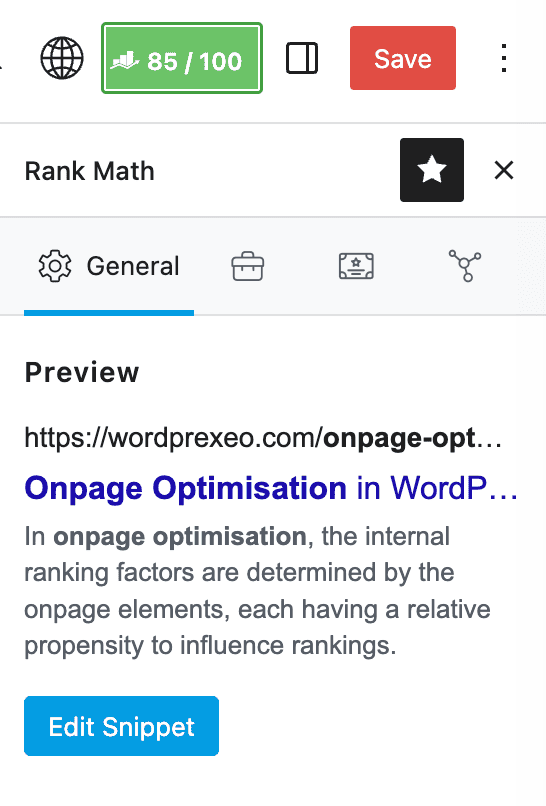
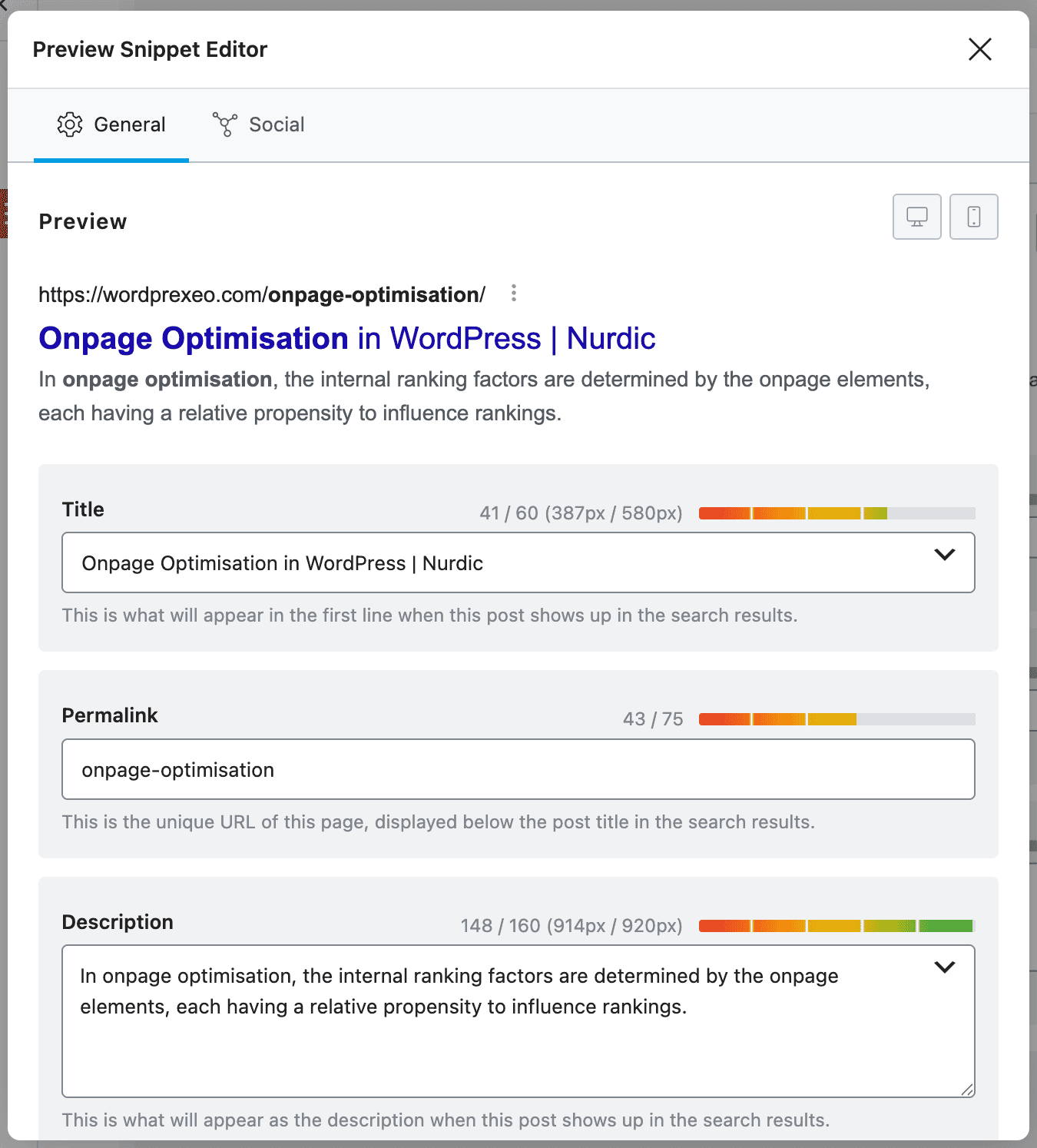
As you make edits, the RankMath Preview section will display in real-time how your Meta Description will look like in Google SERPs. This presents a great opportunity to ensure your Meta Description is of the right length.
If you have certain target keywords set up within the “Focus Keyword” section of Rankmath, these will be highlighted in bold for Meta Descriptions as well as Page Titles and URLs, exactly the way you would expect for them to be highlighted in Google Search when users search for those particular keywords.
Once Pages or Posts have been published, the need to change the Meta Descriptions for multiple pages in a row is not at all uncommon. If you’d like to change the Meta Descriptions for a few pages, the most convenient method is through the “Quick Edit” panel within the “All Pages” or “All Posts” view.
Editing Meta Descriptions using “Quick Edit” within “All Pages” or “All Posts” view
Open your “All Pages” or “All Posts” view in WordPress and navigate to the Page or Post you want to edit the Meta Description for and Press “Quick Edit“, then Edit the Meta Description within the “SEO Description” field.
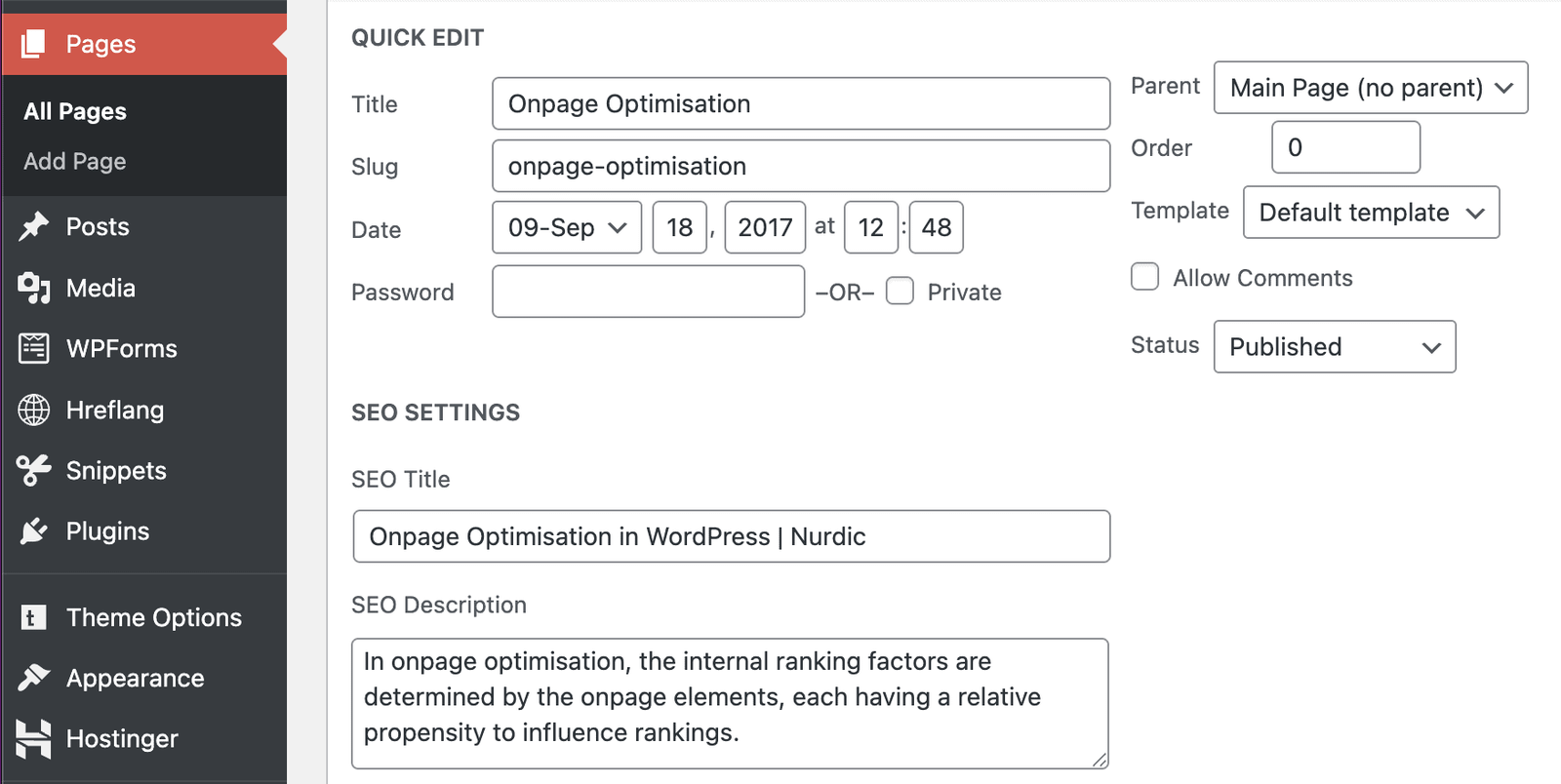
The latest specified Meta Description within the Page view or within the Quick Edit view will take precedence. So when adding a meta description within the “Quick Edit” view, Rankmath will also replace the meta description that was previously specified within the Preview Snippet Editor of the Page or Post and vice versa.