
Image Optimisation for Search Engines can be dissected into two distinct aspects:
- Onpage Image Optimisation: Focuses exclusively on the aspects of metadata, image discoverability and relevancy signals sent to search engines, typically optimised on a per-image or per-landing-page basis .
- Image Performance Optimisation, as part of Technical SEO: Focuses on the technical characteristics and performance aspects of images as well as their impact on page loading speeds, typically optimised through more complex technologies applied across the entire media library.
Table of Contents
In the context of Onpage Optimisation, Image Optimisation for search engines refers to the practice of:
- Using relevant images with appropriate attribution
- Descriptive image file names, titles, ALT descriptions
- Proper referencing in XML sitemaps
- Diagnosing, fixing and preventing common image errors related to semantics
Image Optimisation Importance
Hardly anyone can argue with the fact that images facilitate our ability to assimilate complex information or build an emmotional connection. However, it’s important to note that an indelicate use of images has just as much potential to tank your website engagement as a tactful choice of images has got the potential to uplift it.
- Presenting data in graphical formats like a diagram as opposed to plain text to illustratte complex ideas.
- Showcasing your product or giving a feel for the services you provide help create more accurate expectations.
- Images of your company’s team members can elevate the trust in your brand.
If your images are indeed engaging and add value to your website, this translates into better user engagement on your website which is an organic ranking factor on its own. However, users spending more time on your website and being less inclined to go back to search results to look for a different URL means longer Dwell Time which also positively impacts organic search rankings.
Search engine bots don’t understand images quite as well as a website user does, so they often rely on additional specifications, such as file names, titles and ALT descriptions to make judgements about them.
Making appropriate use of these additional elements allow search engines to get a tighter grip on the relevancy signals for your images and the landing page they’re displyed on. Upon processing these semantic specifications of image content, search engines are enabled to make more refined decisions on what keywords to show those images for in Image Search. They also use said meta specifications of image content in their decisions on how to rank the landing pages that features them.
Additionaly, image titles are shown as a tooltip when a user hovers their mouse over the image. ALT text is used by screen readers of visually impaired users to interpret the contents of an image and displayed by browsers when an image can’t be rendered.
While search engine bots primarily discover images through the landing pages they are featured on, images can also be included in XML sitemaps to aid their discovery by search engine bots. Conversely, some images may be purely decorative, adding no real semantic value to the website content in which case they can be excluded from XML sitemaps to prevent wasting the crawl budget.
As a website grows and changes, technichal and human errors do occur. As part of Image Optimisation in Onpage Optimisation, you need to be able to diagnose and fix such image-related errors on an ongoing basis. Failure to do so may result in a negative impact on your website’s ability to rank in organic search.
So, your commitment to promptly address these image-related errors will contribute to your website not being held back in organic search rankings and always employing its full prowess when competing in organic search results.
Image Uniqueness and Originality
When using images, you will want them to add value to your site. If you fill your website with stock imagery, you’ll look unoriginal or in other words, like thousands of other websites that don’t stand out. While you may have your stock images perfectly edited and optimised, it won’t have the same impact or potential SEO benefits as a genuine, highly-relevant image. The reason behind this is that original imagery sends out good E-E-A-T signals to search engines (Google) about the credibility of your website.
On the other hand, if you’re using images from around the web or from stock photography websites, you’re running into a number of issues straight from the beginning.
- Your website will look uninspiring as these images could be potentially found on other websites from your niche as well as outside of it.
- You will have to provide appropriate credit to their authors which can be a rather time-consuming endeavour, not to mention it would chunk out the authenticity of your website.
- Unaltered stock imagery shows a lack of commitment to the vision behind your brand.
When you create original images you can earn backlinks from other relevant websites that will want to use it within their own content. In fact, there is an entire link-building strategy focused on this, with examples like infographics, graphs, mind maps and photographs that are embedded into other websites, linking back to the original source.
Using Unsplash for Creative Commons Images
If, however, you are limited in terms of budget and must go with stock imagery, a good option is Unsplash.com, one of the world’s largest resources for photographs and illustrations under Creative Commons. It goes without saying that you should use images that are highly relevant to the topic you’re discussing and align with your niche.
Put the imagery of your website in the context of what you already know about SEO and Content Marketing. When you’re trying to claim your spot in the organic rankings with your written piece, simply copying it from another source would be the last thing that you would want to do. So why would you consider this approach for images, a part of your website that could add value rather than subtract it.
Attributing Creative Commons To Images
When images are taken from other sources for free, it is important to reference the rightful owners ensuring everyone is correctly credited for their work. This also prevents the spread of stolen or copied images to other domains. In most cases, if you’re using an image, you’re legally required to attribute it, and failing to do so may lead to legal proceedings.
The Creative Commons (CC) framework defines attribution as giving “appropriate credit” through a simple and flexible method that accounts for the requirements of the various CC licenses. To make sure images are correctly attributed, include the following details and make sure they are clearly displayed by the relevant image (ideally directly underneath):
- Title: The title of the image.
- Author: The name of the creator.
- Source: The URL where the image is hosted.
- License: The type of Creative Commons license it is available under, including a link to the relevant license.

Here are some helpful hints for correctly attributing a Creative Commons image:
- Make sure you do the work to attribute images per TASL method, including sourcing missing information if necessary.
- Where there are multiple creators, list each one of them.
- Only substitute a username or handle in cases where the creator’s full name is not available.
- If there’s any doubt as to how the creator(s) should be credited, get in contact with the copyright owner.
- Make sure the attribution is fully visible.
You might come across Creative Commons images that have no clear link to their creator or license type. In this case, publishing an image without identifying the creator immediately breaches the terms of a Creative Commons license. The only exception to the rule is if the image is attributed to a CC0 license. If there is no clear link to the creator or license type of an image – just don’t use it. Outside of Creative Commons, images should be attributed to their creator as per the license agreement under which they were procured.
Attribution can take a variety of forms, and it’s standard practice for it to be negotiated into any licensing agreement as part of the work’s usage terms. Some photographers will charge higher fees for publication of their work without attendant attribution – this makes sense when you consider that attribution is a form of advertising for the photographer.
When Not To Use Images
An image is worth a thousand words, however, don’t take it too far by using images to add more text. It’s just bad user experience, since not only can the text get pixelated and distorted in terms of size, but it also changes the experience of interaction with text, limiting its ability to be copied to clipboard and shared.
Similarly, do not use images where you can use code, especially for navigation and interaction elements, as these can lead to really odd user experiences, not to mention slower page loading speeds. The use of text in images that feature diagrams is acceptable. However, it becomes up to you to nail the size and font of the text to match the one that is used on the page. Otherwise, the readability of the page may suffer.
Using HTML Diagrams instead of Images
You can use HTML diagrams or SVG illustrations instead of PNG images to illustrate ideas. The benefits of using an HTML diagram instead of an image is that the content becomes indexable by search engines and the file size is kept to a minimum. Below is an example of a HTML diagram built using Diagrams.net
Naming and Describing Images
Firstly, in the context of SEO, Image Optimisation involves finding a number of code elements that help describe them to search engines, including the image’s File Name, Image Title and ALT Tag.
- The image File Name is the name of the file you upload to the media library which will be automatically applied to the last slug of the URL under which that file will be available.
- In WordPress, the Image Title will be populated automatically based on the image file name, uploaded to Media Library. Best Practice is to edit the Image Title, whereby you replace the hyphens separating the words with spaces. This will make them more intelligible to users when displayed in browser to users upon hovering the mouse over the image.
- The ALT Text is meant to describe the image to search engines or visually impaired users and can usually accommodate a bit more text than the file names or titles. This text will also be displayed instead of the image when it is broken.
It is of paramount importance to write these according to their intended purposes, making them descriptive enough for both search engines and users about the contents of the image. The appropriate use of the Image File Name, Title and ALT Text may:
- Facilitate the organic rankings of the landing page the image is featured on
- Facilitate the organic rankings of the image in image search
- When used as part of an internal link, image metadata is used by search engines as a relevancy signal about the page it links to
The recommended length for Image Title and File Name are a few words long and should ideally be kept to a minimum while remaining descriptive. The ALT Text must be no longer than 125 characters. In the rare event of an image that requires a longer explanation of its content, the use of a LONGDESC attribute can be employed, which allows for the accommodation of a longer description.
The SEO Best Practice would suggest the words in the File Name to be separated by the hyphen, while those in the Title, ALT Text and LONGDESC to be written normally, using spaces.
Uploading Images to the Media Library
- Normalise writing your image file name in lowercase with hyphens instead of spaces to separate words, as all images will automatically create URLs that should use lowercase letters. This is to prevent future cross-platform issues caused by alternative case-sensitivity and case-insensitivity settings applied to your image URLs.
- Whenever possible, the illustrated images should be uploaded in the SVG format due to infinite scaling and smaller file size. Otherwise use the PNG format as an alternative, also known as a lossless format. For the photographic images use the JPEG, also known as a lossy format.
- For animated images, you can use either animated SVG which should be the prefered option for illustrated images. Otherwise, you may also use GIF as an alternative format.
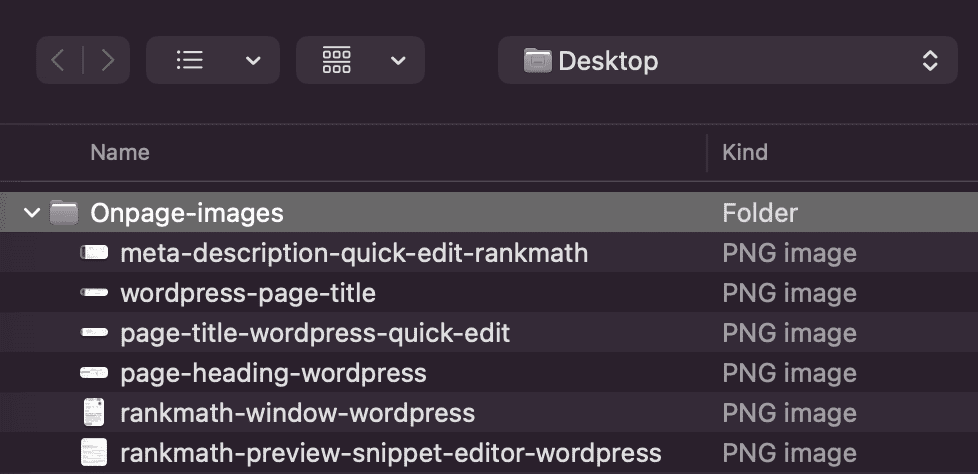
Using the suggested image format depending on the kind of image you upload ensures the images will be displayed with all their properties and in all the richness they were envisioned, while keeping the file size to the minimum.
Editing the Image Title And ALT Tag In WordPress
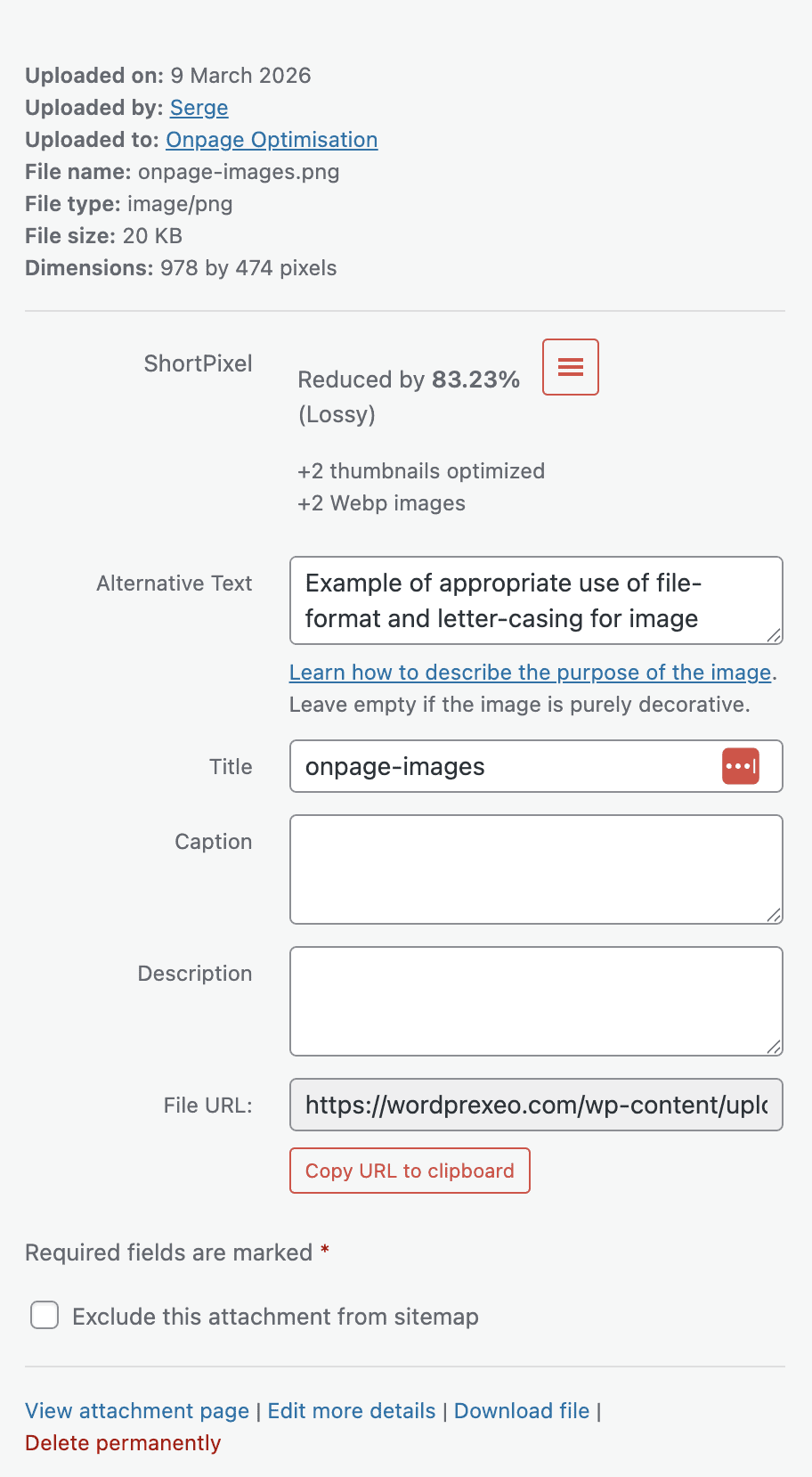
- In order to edit the Image Title and ALT Text navigate to the “Media” > “Library” section of WordPress.
- Select the image you want to edit the metadata for.
- Edit the Image Title and Alternative Text from within the corresponding fields.
- You will also be presented with options for Description (a longer image description) and Caption (shown directly under the image).
- RankMath also provides the option to exclude the image from the XML sitemap. Use it for images which are irrelevant to the website content.
Add Images To The Sitemap
If your images are highly relevant to the content of your page or website, you may want images listed in your XML sitemap. Having your images in your XML sitemap greatly increases the chances of search engines crawling and indexing your images.
Adding Images to XML Sitemaps in WordPress
If you’re using WordPress, RankMath offers an XML sitemap solution in their plugin.
To ensure that your image XML sitemap is turned on you must navigate to RankMath > Sitemap Settings, then find the General tab.
This tab features two controls, one for enabling Image in Sitemaps and the other for including Featured Images (which don’t necessarily need to be present on the actual landing page, but will show on Social Media posts.
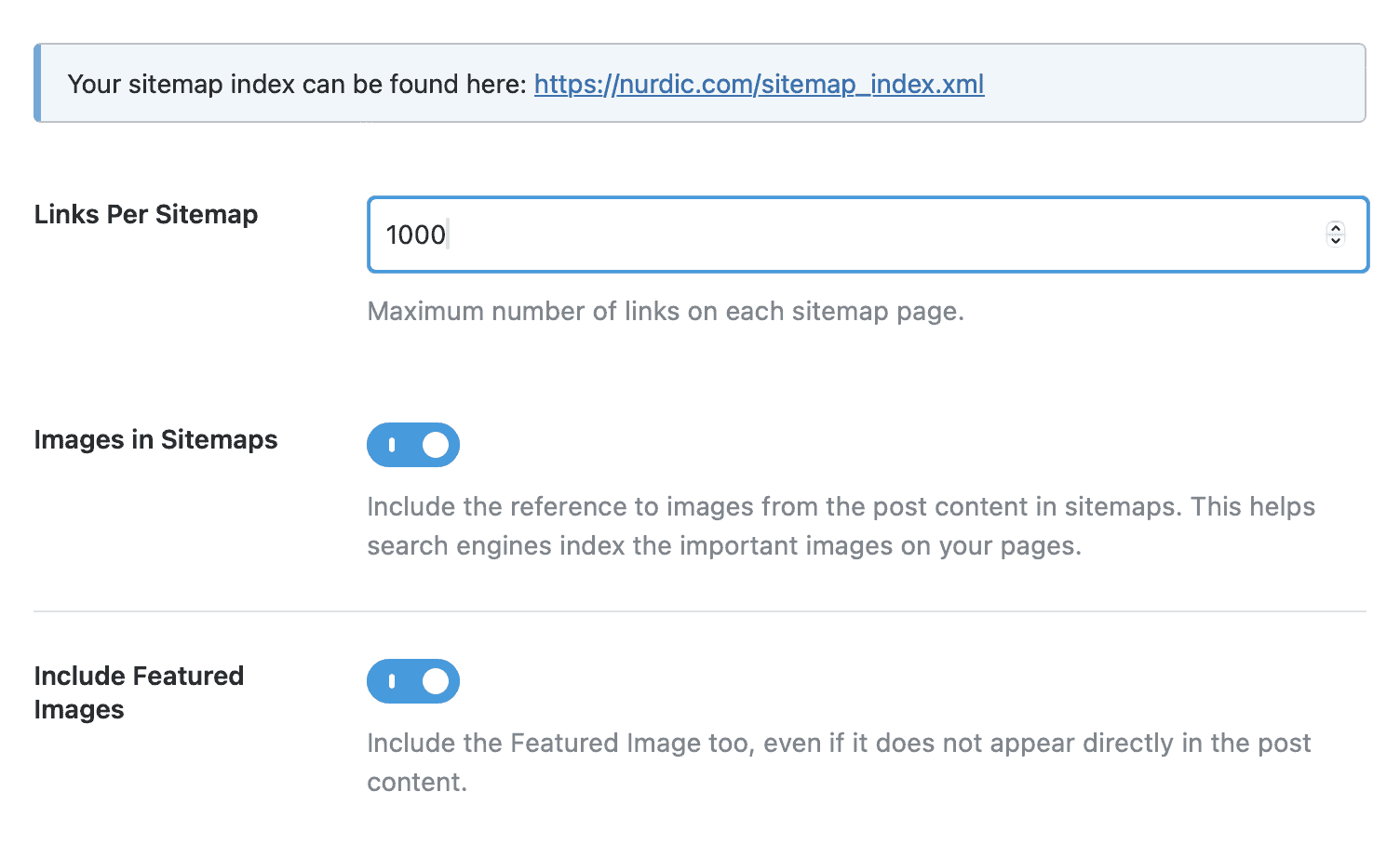
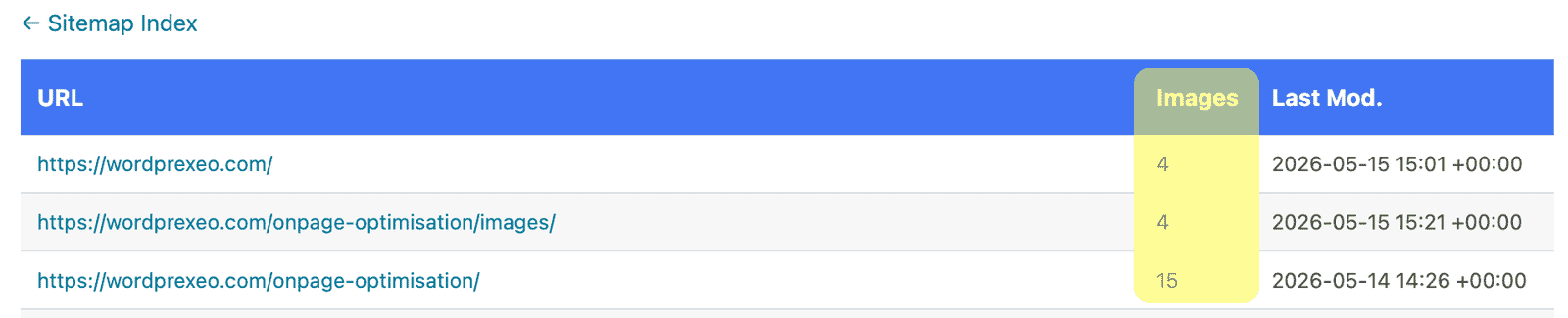
Enabling the Rankmath toggle for Images in Sitemaps will make it the default behaviour for Rankmath to reference the number of images in the respective XML sitemap, next to the landing page URL they’re displayed on.
Diagnosing Common SEO Issues with Images
If you’re working on a website that has been around for some time, chances are you will have to optimise existing images, so this section will detail exactly how to spot errors and optimisation opportunities for your images. Some of the things you will have to look for are Broken Image Links and Missing ALT text.
1. Fixing Broken Image Links
One of the most common issues with images is that they simply can’t be located due to a URL change or a number of other reasons. This affects your SEO efforts in several ways:
- Broken image links could signal that your site is not well maintained which can potentially result in lower orgamic rankings.
- Broken Image links result in poor User Experience (UX), as visitors will be inclined to view your website as less reliable which leads to higher Bounce Rates and overall reduced User Engagement
- Broken Image links lead to Search Engines not being able to index your images which means they won’t be accessible through Image Search.
2. Editing Missing ALT Text
As we’ve explored above, ALT text helps Search Engines and visually-impaired users determine what the image is about and does reflect on Organic Search Rankings. Luckily, you do not need to look at every image on your site to find those that are missing ALT tags, you may simply run a crawl in an SEO crawler like Sitebulb and it will give you the list of images with missing ALT text.